
Why Order Confirmation Displays Are Now Essential for Restaurants
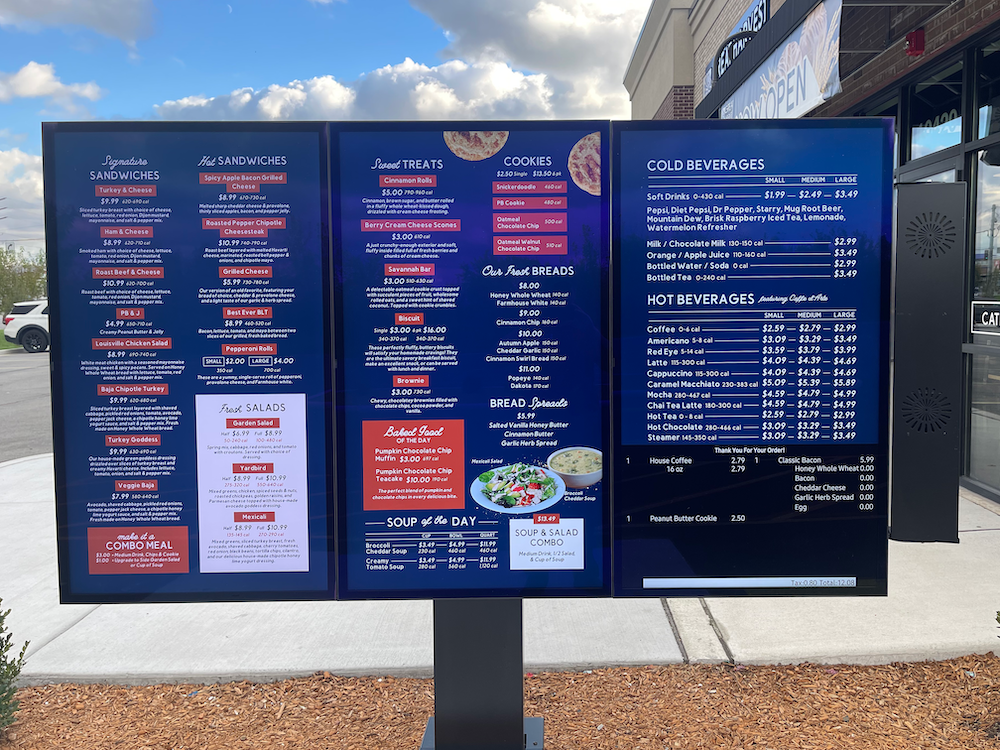
Today’s quick-service and fast-casual customers expect more than a verbal readback of their order. They want to see it on screen — every item, every modification, every dollar amount — before they tap their card. That expectation has made order confirmation displays a baseline feature for competitive restaurant operations. Menuboard Manager from OSM Solutions now delivers this capability natively, turning existing digital menu boards into real-time, customer-facing order verification screens without additional hardware or complex workflows.
How It Works: Seamless POS Integration in Real Time
The technology behind order confirmation in Menuboard Manager relies on direct integration with leading point-of-sale platforms, including Qu and Northstar POS. As soon as a cashier or drive-thru attendant enters items into the POS terminal, the data flows instantly to a designated display screen. Customers watch their order populate line by line — item names, customizations, individual prices, and a running total — all updating live as the transaction progresses.
Because the entire process is automated, there is no need for staff to manually relay order details or print interim receipts. The integration handles everything in the background, freeing employees to focus on speed of service and food preparation rather than reading orders back to guests across a noisy counter or drive-thru speaker.
Drive-Thru Accuracy: Solving a Persistent Problem
Drive-thru lanes are where order errors hit hardest. Background traffic noise, low-quality speaker systems, and the pressure to maintain speed all contribute to miscommunication between staff and customers. A visual order confirmation screen mounted at the drive-thru menu board eliminates much of that guesswork. Guests can verify every detail before pulling forward, which means fewer incorrect orders, fewer costly remakes, and significantly less food waste.
OSM Solutions designed this feature to slot into existing drive-thru configurations effortlessly. Restaurants can dedicate a standalone screen to order confirmation or use split-screen layouts that display promotional menu content alongside live order data — maximizing the value of every screen in the lane.
Indoor Benefits: Faster Lines, Happier Guests
The advantages extend well beyond the drive-thru window. Counter-service locations, airport food courts, and cafeteria-style operations all benefit from real-time order confirmation at the register. During peak lunch and dinner rushes, when transaction speed directly impacts revenue, a confirmation screen gives customers instant visual assurance that their order is correct. Staff spend less time resolving disputes and more time moving the queue forward.
Order accuracy also has a measurable impact on customer loyalty. When guests consistently receive exactly what they ordered, trust in the brand deepens, repeat visits increase, and negative reviews tied to wrong orders decline. These are outcomes that compound over time and contribute directly to a restaurant’s bottom line.
Deploy Order Confirmation With Your Existing Digital Signage
One of the strongest aspects of this feature is how naturally it fits into an existing Menuboard Manager deployment. There is no need for a complete system overhaul or expensive new equipment. Restaurants already running digital menu boards through the platform can activate order confirmation on any connected screen, configure their preferred layout, and go live quickly. Whether you manage a single storefront or a multi-unit chain, the cloud-based architecture of Menuboard Manager ensures centralized control and consistent performance across every location.
Ready to reduce order errors and deliver a more transparent customer experience? OSM Solutions can help you integrate real-time order confirmation into your digital signage strategy. Contact us today to schedule a personalized demo and see the feature in action.
